Introduction
Peisar is a high-performance Markdown parser and renderer engineered in Rust, providing native support for CommonMark, GitHub Flavored Markdown (GFM), Kramdown block attributes, and multi-format frontmatter extraction. Designed with a Rust-first core architecture, Peisar exposes its functionality natively to Rust applications via crates.io and to JavaScript/TypeScript environments through Node.js N-API bindings and WASM targets.
- CommonMark blocks and inlines, including HTML and reference links
- GFM tables, strikethrough, task lists, and autolinks
- Kramdown block attributes such as
{:#intro .lead key="value"} - YAML, TOML, and JSON frontmatter extraction (raw content, not deserialized)
- AST visitors and parser hooks through
Peisar.use() - Native Node.js addon and Rust library surfaces
Get started
Contributing
Contributions are what make the open-source community such an amazing place to learn, inspire, and create. Any contributions you make are greatly appreciated!
Whether you’re fixing a typo, improving documentation, reporting a bug, or proposing a new feature, we’d love your help.
- Check out our Contributing Guidelines for setup instructions and style rules.
- Browse our open issues — look for the
good first issuelabel if you’re new to the project. - Fork the repo, create your branch, and open a Pull Request!
Not sure where to start? Feel free to open a Discussion or ask a question on an issue. We’re happy to help!
License
Except as otherwise noted, the content of this documentation is licensed under the CC BY 4.0 and source code are licensed under the Apache-2.0
Installation
Peisar is distributed dual-natively as a Rust crate on crates.io and a native Node.js addon (powered by N-API) on npm.
Node.js
To install the native Node.js package in your project, use your preferred package manager:
npm i peisar
The package contains pre-built native bindings for major platforms, eliminating the need for local compilation during normal installation.
Rust
To add Peisar to a Rust project, include it in your Cargo.toml. No special feature flags are required for standard Rust usage; the default feature set compiles the core engine and high-level wrappers:
[dependencies]
peisar = "2.1.0"
The npm Cargo feature is reserved strictly for building the N-API native Node.js bindings and should not be enabled in pure Rust projects.
Supported Platforms and Targets
Node.js Targets
The npm package supports pre-compiled N-API binaries targeting:
- Linux: x64, arm64 (GNU and musl)
- macOS: x64, arm64 (Apple Silicon)
- Window: x64, arm32, arm64
Rust Targets
As a pure Rust crate, Peisar compiles to any target supported by the Rust compiler (rustc) supporting std (edition 2021+), including embedded systems, WebAssembly targets (wasm32-wasip1), and serverless environments.
Quick Start
Peisar parses a Markdown string and exposes its abstract syntax tree (AST), rendered HTML, and frontmatter. Choose the Node.js or Rust example to get started.
Node.js
Install the package:
npm install peisar
Parse and render a Markdown document:
import { Peisar } from "peisar";

const document = new Peisar("# Hello **world**", { fragment: true });

console.log(document.html);
// <h1>Hello <strong>world</strong></h1>
console.log(document.ast);
fragment: true returns only the rendered content. Without it, Peisar
generates a complete HTML document. See the Node.js overview
for frontmatter and plugin examples.
Rust
Add Peisar to your Cargo.toml:
[dependencies]
peisar = "2.1.0"
Then parse and render Markdown:
#![allow(unused)]
fn main() {
use peisar::{Peisar, PeisarOptions};

let mut document = Peisar::new(
    "# Hello **world**\n".into(),
    Some(PeisarOptions {
        fragment: Some(true),
        ..Default::default()
    }),
);

println!("{}", document.html());
}
See the Rust overview for lower-level AST access and frontmatter.
Next steps
Node.js usage
Peisar’s main Node.js package is the native addon published as peisar.
Use it in Node.js servers, scripts, build tools, and frameworks that can load
native .node binaries.
This page is the Node.js overview. Use it as the entry point for framework, runtime, and API-specific guides.
At a glance
- Package:
peisar - Module surface:
require("peisar")orimport ... from "peisar" - Runtime requirement: see the
engines.nodefield in the root package.json - Browser and WASI runtimes: see WASM
- Full API details: see Node.js API reference
For browser-only runtimes or environments that cannot load native addons, use the WebAssembly package documented in WASM.
Install
npm i peisar
Basic usage
const { Peisar } = require("peisar");

const document = new Peisar(
  `---
title: Hello
---

# Hello **world**`,
  { fragment: true },
);

console.log(document.html);
console.log(document.frontmatter);
Current API structure
The Node.js API in the peisar namespace currently centers around these
classes and properties:
| Export | Purpose |
|---|---|
Peisar | Parse one Markdown document and read ast, html, or frontmatter |
PeisarAst | Parse a document and read its AST or frontmatter without rendering |
document.frontmatter | Read the detected frontmatter type and raw contents |
Frontmatter is returned as { frontmatterType, raw }. The type is "Yaml",
"Toml", "Json", or "Empty"; Peisar does not deserialize the raw content.
See the API reference for the formats and shape.
Detailed signatures and option shapes are in the Node.js API reference.
Preferred extension API
Use Peisar.use() for Node.js integrations. A plugin may provide any
combination of:
visitBlockvisitInlineparseBlockparseInline
const { Peisar } = require("peisar");

const document = new Peisar("# Hello", { fragment: true });

document.use({
  visitBlock([block]) {
    if (block.type === "Heading") {
      return { recurse: true };
    }
  },
});
Related guides
Node.js usage: Next.js
Use the native peisar package in Next.js when Markdown parsing happens on
the server.
If you need client-side rendering in the browser, follow the Vite or WASM guides instead.
Install
npm i peisar
Configure Next.js
Next.js should treat peisar as a server-side external package so Node.js can
load the native addon from node_modules.
next.config.ts
import type { NextConfig } from "next";

const nextConfig: NextConfig = {
  serverExternalPackages: ["peisar"],
};

export default nextConfig;
next.config.js or next.config.mjs
/** @type {import('next').NextConfig} */
const nextConfig = {
  serverExternalPackages: ["peisar"],
};

module.exports = nextConfig;
// or: export default nextConfig
Example usage
import { Peisar } from "peisar";
import fs from "node:fs";

const content = fs.readFileSync("README.md", "utf8");
const document = new Peisar(content, { fragment: true });

export default function Home() {
  return <div dangerouslySetInnerHTML={{ __html: document.html }} />;
}
When not to use the native package
Do not use the native Node.js package in environments that cannot load .node
bindings, such as:
- browser bundles
- Edge runtimes
- WASI-only environments
For those cases, use the WASM guide.
Node.js usage: Vite
For direct browser-side parsing, Vite applications should use Peisar’s
WebAssembly package instead of the native peisar package. To import Markdown
files as React components, use the
vite-plugin-peisar plugin.
Import Markdown with vite-plugin-peisar
The plugin lets a Vite application import Markdown as a React component, or import its rendered HTML, original source, and frontmatter. Install it with:
npm install vite-plugin-peisar
Add it to your Vite configuration alongside the React plugin:
import react from "@vitejs/plugin-react";
import { defineConfig } from "vite";
import { vitePluginPeisar } from "vite-plugin-peisar";

export default defineConfig({
  plugins: [react(), vitePluginPeisar()],
});
The plugin creates src/vite-peisar-env.d.ts with the required module
declarations. To add the declarations yourself, create that file with:
/// <reference types="vite/client" />
/// <reference types="vite-plugin-peisar/client" />
Import a Markdown file as a React component:
import Guide, { frontmatter, html, raw } from "./guide.md";

export function Page() {
  return (
    <article>
      <h1>{frontmatter.title}</h1>
      <Guide />
    </article>
  );
}
The default export renders the Markdown as a React component. Named exports
provide the rendered html, original raw Markdown, and parsed frontmatter.
To import rendered HTML as the default export, use the ?html query:
import html, { frontmatter, raw } from "./guide.md?html";
See the
vite-plugin-peisar README
for supported extensions and plugin options.
Use WASM for direct parsing
Install
npm i @peisar/peisar-wasm32-wasi
Basic usage
import { Peisar } from "@peisar/peisar-wasm32-wasi";

const document = new Peisar("# Hello from Vite", { fragment: true });

console.log(document.html);
Vite configuration
The WASM package uses threads, so local development and preview must enable cross-origin isolation headers. Exclude the package from Vite’s dependency optimizer so its worker setup is preserved.
import { defineConfig } from "vite";
import react from "@vitejs/plugin-react";

export default defineConfig({
  server: {
    headers: {
      "Cross-Origin-Opener-Policy": "same-origin",
      "Cross-Origin-Embedder-Policy": "require-corp",
    },
  },
  plugins: [
    react(),
    {
      name: "configure-preview-response-headers",
      configurePreviewServer(server) {
        server.middlewares.use((_req, res, next) => {
          res.setHeader("Cross-Origin-Opener-Policy", "same-origin");
          res.setHeader("Cross-Origin-Embedder-Policy", "require-corp");
          next();
        });
      },
    },
  ],
  optimizeDeps: {
    exclude: ["@peisar/peisar-wasm32-wasi"],
  },
});
After changing the config, clear Vite’s optimized dependency cache and restart the dev server:
rm -rf node_modules/.vite
npm run dev
Production notes
- Configure the same headers in production.
- Verify
globalThis.crossOriginIsolated === true. - With
Cross-Origin-Embedder-Policy: require-corp, cross-origin assets must also allow embedding through CORS orCross-Origin-Resource-Policy.
Node.js usage: WASM
Use the WebAssembly build when the runtime cannot load native .node
bindings, or when you want to force the WASI path explicitly.
Packages
The native package is:
npm i peisar
The WebAssembly package is:
npm i @peisar/peisar-wasm32-wasi
How fallback works
The main peisar package prefers a native binary selected through npm
optionalDependencies. If no native binding can be loaded, the generated
loader can fall back to @peisar/peisar-wasm32-wasi.
Install both packages when you want automatic fallback:
npm i peisar @peisar/peisar-wasm32-wasi
Environment variables
You can control binding selection with NAPI_RS_FORCE_WASI:
NAPI_RS_FORCE_WASI=true— prefer the WASM build and keep the native binding as a lazy fallbackNAPI_RS_FORCE_WASI=error— require the WASM build and fail when it is missing
Browser-focused usage
For browser apps, import the WASM package directly:
import { Peisar } from "@peisar/peisar-wasm32-wasi";

const document = new Peisar("# Hello", { fragment: true });
console.log(document.html);
If you are using Vite, also follow the Vite guide for the required isolation headers and optimizer configuration.
Node.js API reference
This document covers the Node.js API in the peisar namespace exposed by the
peisar package. Its main entry point parses and renders a single Markdown
document.
peisar API
| Export | Kind | Purpose |
|---|---|---|
Peisar | class | Parse Markdown and access its AST, HTML, and frontmatter |
PeisarAst | class | Parse Markdown and access its AST and frontmatter |
PeisarOptions, AstOptions, RenderOptions | interfaces | Configure parsing and rendering |
PeisarDocument, Block, Inline, and supporting AST types | types | Describe AST nodes, spans, attributes, and table/list data |
PeisarPlugin and plugin context/result/control types | interfaces and types | Implement parser hooks and AST visitors |
Frontmatter, FrontmatterType, FrontmatterResult | interface and type | Describe extracted frontmatter |
Peisar
Constructor
new Peisar(markdown: string, options?: PeisarOptions)
Getters
| Member | Type | Description |
|---|---|---|
ast | PeisarDocument | Parsed AST as a JavaScript object |
html | string | Rendered HTML |
frontmatter | Frontmatter | Detected format and raw frontmatter content; not deserialized |
Methods
use(plugin) registers parser hooks, AST visitors, or both on the document.
Registering a plugin invalidates any cached HTML.
setHtmlCacheEnabled(enabled) enables or disables an instance-local cache of
the most recently rendered HTML. Caching is disabled by default and is cleared
when disabled or when a plugin is registered.
const { Peisar } = require("peisar");

const document = new Peisar("# Hello", { fragment: true });
document.use({
  visitBlock([block]) {
    if (block.type === "Heading") return { recurse: true };
  },
});
Visitor callbacks receive a one-element tuple containing the node, so
visitBlock([block]) and visitInline([inline]) are the callback forms.
Visitors run when the AST or HTML is accessed. Parser hooks run before the
built-in matchers; registering them reparses the original source.
PeisarAst
PeisarAst provides lower-level parsing without rendering:
const { PeisarAst } = require("peisar");

const parsed = new PeisarAst("# Hello");
const ast = parsed.getAst();
const frontmatter = parsed.getFrontmatter();
It also provides addPlugin(plugin) and clearPlugins(). Its optional
AstOptions supports gfm, kramdown, and fileName.
PeisarOptions
All properties are optional.
| Property | Type | Default | Description |
|---|---|---|---|
gfm | boolean | true | Enable GitHub Flavored Markdown |
kramdown | boolean | true | Enable Kramdown block attributes |
fileName | string | undefined | Attach a file name to the parsed document |
fragment | boolean | false | Render a fragment instead of a full HTML document |
charset | boolean | true | Include <meta charset> in full-document mode |
viewport | boolean | true | Include <meta name="viewport"> in full-document mode |
title | string | undefined | HTML <title> in full-document mode |
bodyClass | string | undefined | Extra classes for <body> in full-document mode |
style | string | undefined | Inline CSS added to <head> |
Plugin object
Each property is optional:
type Plugin = {
  visitBlock?: (args: [block: object]) => VisitorControl | void;
  visitInline?: (args: [inline: object]) => InlineVisitorControl | void;
  parseBlock?: (args: [ctx: BlockParserContext]) => BlockParseResult | void;
  parseInline?: (args: [ctx: InlineParserContext]) => InlineParseResult | void;
};
Visitor controls include insertBefore, insertAfter, replaceWith,
remove, and recurse. Block parser hooks return a block and the number of
lines consumed; inline hooks return an inline and the number of characters
consumed. A parser hook can return undefined to decline the current input.
The generated TypeScript declarations place these classes and types under
peisar; JavaScript examples can import the classes from the package root as
shown above.
Frontmatter is recognized at the start of the Markdown source:
| Format | Opening | Closing |
|---|---|---|
| YAML | --- | --- |
| TOML | +++ | +++ |
| JSON | { or optional ;;; followed by { | Matching }; with ;;;, a closing ;;; is required |
The raw property contains the text between YAML/TOML delimiters or the
complete JSON object without optional ;;; delimiters. frontmatterType is
one of "Yaml", "Toml", "Json", or "Empty". No YAML, TOML, or JSON
parsing or validation is done. When no complete frontmatter is found, the
type is "Empty" and raw is an empty string.
Rust usage
Peisar provides a high-level Rust parser wrapper and lower-level AST, render, and plugin APIs. These modules are available without Cargo feature flags.
Install
[dependencies]
peisar = "2.1.0"
No Cargo features are needed when using Peisar from Rust. The npm feature
only enables N-API bindings for the Node.js package.
The public Rust API includes:
| Public API | Purpose |
|---|---|
peisar::{Peisar, PeisarOptions} | High-level parsing, HTML rendering, and front matter |
peisar::{Frontmatter, FrontmatterType} | Detected frontmatter format and raw content |
peisar::ast | AST types and parser helpers |
peisar::render | HTML renderer and render options |
peisar::plugin | Plugin types, traits, and visitor helpers |
Frontmatter is extracted as raw content; it is not deserialized as YAML, TOML, or JSON.
Parse and render
The high-level wrapper is re-exported at the crate root:
#![allow(unused)]
fn main() {
use peisar::{Peisar, PeisarOptions};

let mut document = Peisar::new(
    "# Hello **world**\n".into(),
    Some(PeisarOptions {
        fragment: Some(true),
        ..Default::default()
    }),
);

assert_eq!(document.html(), "<h1>Hello <strong>world</strong></h1>\n");
}
For lower-level AST parsing:
#![allow(unused)]
fn main() {
use peisar::ast::PeisarAst;

let mut document = PeisarAst::new("# Hello\n".into(), None);
assert_eq!(document.get_ast().children.len(), 1);
}
Use the high-level wrapper for HTML and front matter:
#![allow(unused)]
fn main() {
let mut document = Peisar::new("---\ntitle: Hello\n---\n\n# Hello".into(), None);
let frontmatter = document.frontmatter();
assert_eq!(frontmatter.frontmatter_type, peisar::FrontmatterType::Yaml);
assert_eq!(frontmatter.raw, "title: Hello");
assert_eq!(document.html(), "<h1>Hello</h1>\n");
}
See the Rust API reference for module details and links to the Node.js guides.
Rust API reference
The crate re-exports Peisar, PeisarOptions, and frontmatter types
(Frontmatter, FrontmatterResult, and FrontmatterType) at the root. The
ast, render, and plugin modules are public without feature flags.
peisar::{Peisar, PeisarOptions}
Peisar is the high-level single-document parser and renderer. It exposes
ast(), html(), frontmatter(), and use_plugin() methods.
PeisarOptions configures GFM, Kramdown attributes, file metadata, and HTML
output.
#![allow(unused)]
fn main() {
use peisar::{Peisar, PeisarOptions};

let mut document = Peisar::new(
    "# Hello".into(),
    Some(PeisarOptions {
        fragment: Some(true),
        ..Default::default()
    }),
);
assert_eq!(document.html(), "<h1>Hello</h1>\n");
}
frontmatter() returns a Frontmatter value with frontmatter_type and
raw fields. The content is not deserialized.
peisar::ast
PeisarAst, the AST types, and parsing helpers are available from this module.
md_to_ast parses Markdown directly into a PeisarDocument; the input should
not include frontmatter if you want it extracted separately.
Use PeisarAst for parsing with frontmatter extraction and optional plugins,
or md_to_ast for direct AST parsing.
#![allow(unused)]
fn main() {
use peisar::ast::PeisarAst;

let mut document = PeisarAst::new("# Hello\n".into(), None);
let ast = document.get_ast();
assert_eq!(ast.children.len(), 1);
}
peisar::render
This module provides AstToHtml, ast_to_html, and RenderOptions for
rendering AST documents directly.
peisar::plugin
This module provides the plugin interfaces and visitor helpers. It is
available without enabling a Cargo feature. PeisarPlugin contains optional
visit_block, visit_inline, parse_block, and parse_inline callbacks.
Register it with Peisar::use_plugin() or PeisarAst::add_plugin(). See the
Rust plugin example
for visitor and parser hook examples.
The ast module also exposes token types through peisar::ast::tokens, source
positions through peisar::ast::span, and parser helpers through
peisar::ast::parsers.
Cargo features
No Cargo features are required for Rust APIs. The npm feature enables the
N-API bindings used to build the Node.js package.
Rust code should depend on the crate without a feature list:
peisar = "2"
The npm feature enables the N-API bindings used to build the Node.js
package. See the Rust overview for end-to-end usage.
Peisar documentation
This directory holds the repository-hosted documentation for Peisar.
These docs are intentionally kept outside the package registry metadata so they can be updated between npm and crates.io releases.
Guides
Node.js
Browser
Rust
Current API reference
The API references cover the single-document parser, AST access, and plugin
interfaces. The Node.js reference covers the peisar namespace. Rust’s ast
and plugin modules are available without Cargo feature flags; the npm
feature is only needed to build the Node.js bindings:
Reference
Releases
- Release notes for the next version
- Release notes for the current release
- Full changelog
- Security policy and threat model
Package entry points
- Top-level package page: README.md
- API docs on docs.rs: https://docs.rs/peisar
Benchmark results
Peisar includes a repeatable Node.js benchmark that compares end-to-end Markdown-to-HTML rendering against:
markedmarkdown-itmicromarkwithmicromark-extension-gfmshowdown
The benchmark implementation lives in bench/src/index.js. Running it also regenerates benchmark-results.svg from the measured throughput and heap results.
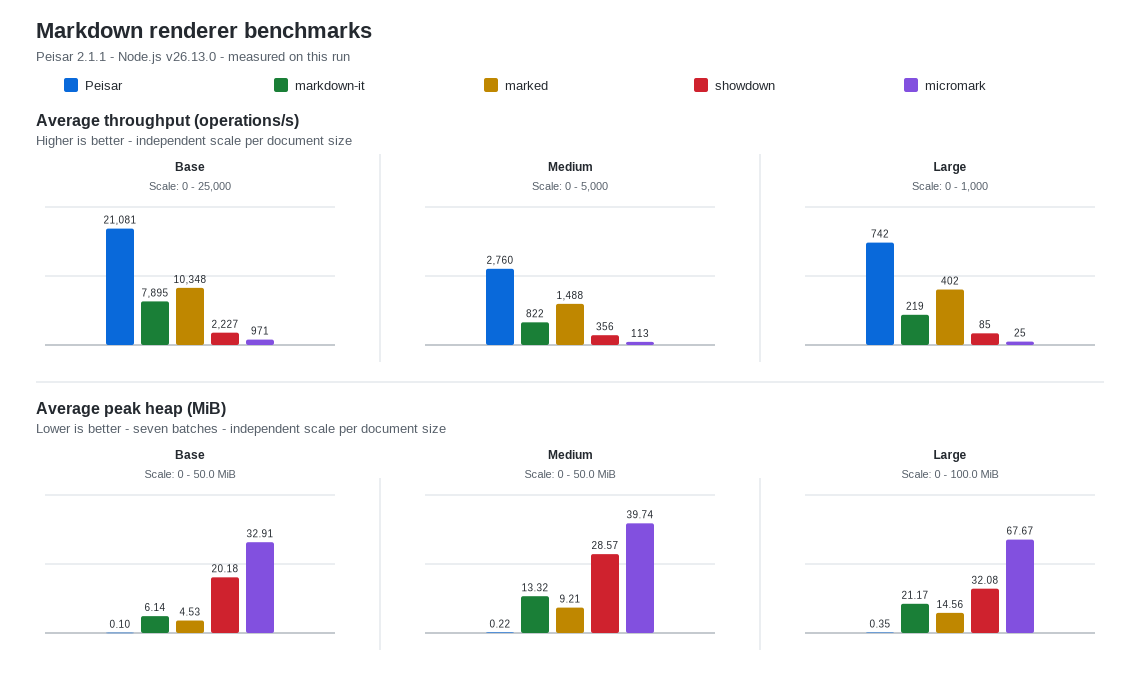
What the benchmark measures
- output validation before timing
- throughput in operations per second
- peak heap usage during repeated renders
- three document sizes built from the same representative GFM input
The current benchmark suite uses:
- Tinybench for timing
node --expose-gcfor more stable memory measurements- Peisar 1.2.3 on Node.js 24.22.1 for the results below
micromarkconfigured with its GFM syntax and HTML extensions- seven memory batches, with 100 / 25 / 10 render iterations per batch for base / medium / large documents
- one base document plus
medium-x8andlarge-x32expanded inputs
Throughput
Average throughput in operations per second (higher is better):
| Scenario | peisar | marked | markdown-it | showdown | micromark |
|---|---|---|---|---|---|
| Base (528 B) | 20,588 | 9,653 | 7,886 | 2,155 | 901 |
| Medium (4,542 B) | 2,625 | 1,329 | 1,001 | 345 | 111 |
| Large (18,220 B) | 723 | 358 | 261 | 80 | 25 |
Average peak heap usage
Measured average peak heap in MiB (lower is better):
| Scenario | peisar | marked | markdown-it | showdown | micromark |
|---|---|---|---|---|---|
| Base | 0.14 | 4.71 | 6.07 | 20.25 | 58.62 |
| Medium | 0.23 | 9.54 | 13.18 | 50.79 | 62.88 |
| Large | 0.35 | 15.29 | 21.01 | 63.88 | 86.15 |
Summary
In the benchmark currently documented in this repository, Peisar had the highest measured throughput and lowest measured average peak heap usage across the tested scenarios, including micromark configured with GFM.
Notes
- Results reflect the workload and configuration in bench/src/index.js.
- Memory profiling uses seven batches with 100 / 25 / 10 iterations per batch for base / medium / large inputs; heap values are approximate and sensitive to the runtime and process state.
- Benchmark results vary with runtime, hardware, input characteristics, and parser configuration.
- Because this file lives in the repository rather than the published package metadata alone, it can be updated between releases.
Run the benchmark
From the repository root:
npm run benchmark
Or directly inside bench/:
cd bench
npm i
npm run bench
Peisar Markdown Language Specification
Version 1.0.0 — describes exactly what peisar parses and renders with
default options (gfm: true, kramdown: true). Every example in this
document was verified against the parser itself.
Peisar implements a practical CommonMark-style core plus GitHub Flavored Markdown (GFM) extensions and Kramdown block attributes. Where peisar differs from strict CommonMark, the difference is called out explicitly.
const { Peisar } = require("peisar");
const doc = new Peisar("# Hello **world**", { fragment: true });
doc.html;      // <h1>Hello <strong>world</strong></h1>\n
doc.ast;       // JavaScript AST object
doc.frontmatter; // { frontmatterType: "Empty", raw: "" }
1. Document structure
A document is a sequence of block nodes. Blocks contain inline content
(or nested blocks). Blank lines separate blocks; they carry no meaning
otherwise. Both \n and \r\n line endings are accepted.
1.1 Frontmatter
Optional frontmatter must start at the very beginning of the document. Supported formats are:
---
title: Guide
---

# The body
+++
title = "Guide"
+++

# The body
{"title":"Guide"}
# The body
;;;
{"title":"Guide"}
;;;

# The body
- YAML uses an opening
---followed by a newline and a closing---line. - TOML uses an opening
+++followed by a newline and a closing+++line. - JSON frontmatter may be an unwrapped top-level object or an object enclosed
by
;;;delimiter lines (the opening delimiter may be followed by a newline). - JSON frontmatter is a top-level object beginning with
{; its closing brace is matched while ignoring braces inside double-quoted strings. When;;;delimiters are used, a closing;;;is required after the object. - The parser only extracts frontmatter; it does not deserialize or validate the YAML, TOML, or JSON content.
- A missing or incomplete frontmatter block is left in the body unchanged.
- In the Node.js API,
document.frontmatteris an object containingfrontmatterType("Yaml","Toml","Json", or"Empty") andraw. The Rust API exposes the correspondingfrontmatter_typeandrawfields.
2. Blocks
2.1 ATX headings
# H1
## H2
###### H6
- 1–6
#characters, optionally indented, followed by a space or end of line. - Seven or more
#, or a missing space (#Hello), is a paragraph. - Inline markup inside headings is parsed (
# a *b*→<h1>a <em>b</em></h1>). - Difference from CommonMark: trailing closing hashes are not stripped
(
## Title ##keeps the##as text). - Setext headings are not supported.
Title\n===is a paragraph;Title\n---is a paragraph followed by a thematic break.
2.2 Paragraphs
Consecutive non-blank lines form one paragraph. A paragraph ends at a blank line or the start of another block construct (heading, fence, thematic break, list marker, blockquote, HTML block, table, link reference definition, or a Kramdown attribute line). Lines within a paragraph are joined by soft breaks.
2.3 Thematic breaks
---
***
___
- - -
Three or more of the same character (-, *, or _), optionally spaced and
indented, on a line by itself. Renders <hr>.
2.4 Fenced code blocks
```rust
fn main() {}
- Fence: 3 or more `` ` `` or `~` characters. The closing fence must use the
  same character and be at least as long as the opener (it may be indented).
- The info string after the opening fence is kept **whole** as the language
  hint: `` ```rust extra `` sets `class="language-rust extra"`.
- Content is captured verbatim (no dedent, no escape processing) until the
  closing fence or end of document. `&`, `<`, `>` are HTML-escaped on render.
- With a language: `<pre><code class="language-rust">…</code></pre>`.
- Without: `<pre><code>…</code></pre>`.
- A fence inside a *longer* fence is content (open with `````` to include ``` ).

### 2.5 Indented code blocks

Four spaces or one tab of indentation:

```markdown
    indented code
    second line
Consume consecutive lines indented by 4 spaces / 1 tab. A single blank line inside is kept if the next line is still indented; otherwise the block ends. No language hint. Renders like a fenced block without a language.
2.6 Block quotes
> Quoted text.
> More.

> Lazy continuation
still part of the quote
- A line starting with
>(optionally indented) opens a quote; one optional space after>is stripped from each line. - Lines without
>continue the quote (lazy continuation) until a blank line. - Quotes nest (
> > …) and their content is re-parsed as a full sub-document (headings, lists, tables all work inside). - Renders
<blockquote>…</blockquote>.
2.7 Lists
- unordered
* also unordered
+ also unordered

1. ordered
2) ordered with paren
- Markers:
-,*,+followed by a space; or 1–9 digits followed by.or)and a space (a bare./)at end of line also counts). - A tab after the marker is not supported (
-\tbis a paragraph). - Continuation lines indented to the item’s content column join the item; non-indented “lazy” lines also join unless they start a new block construct.
- A blank line between items makes a loose list: item content is wrapped in
<p>. Without blank lines the list is tight and a single-paragraph item renders inline (no<p>), matching CommonMark convention. - Ordered lists always render
<ol>starting at 1; the first number is not preserved (nostartattribute). - Items may contain any nested blocks (paragraphs, code, nested lists, quotes).
2.8 Task lists (GFM)
- [ ] unchecked
- [x] checked
- [X] also checked
1. [x] ordered task
A [ ], [x], or [X] marker directly after a list marker turns the item
into a task. The marker is stripped from the text. Renders:
<li class="task-list-item" data-checked="true">
  <input type="checkbox" class="task-list-item-checkbox" checked disabled> done
</li>
(data-checked="true" and checked appear only for checked items.)
2.9 HTML blocks
A line starting with < followed by a letter, /, or ! begins a raw HTML
block. All lines until the next blank line are captured verbatim and
emitted unescaped. <!DOCTYPE html> is passed through the same way.
2.10 HTML comments
A line starting with <!-- opens a comment block, captured until the line
containing --> (or the next blank line if never closed). The AST stores the
comment text without the <!--/--> markers; rendering re-emits
<!-- value -->.
2.11 Tables (GFM)
| Name | Value |
| :--- | ----: |
| a    | 1     |
- A table starts where a line containing
|is followed by a delimiter row whose cells contain only-and:, with at least one-per cell. - Leading/trailing pipes are optional; cells are split on
|and trimmed. - Alignment per column:
:--left,--:right,:--:center,--default. - Header/delimiter/row cell counts may differ; extra cells are kept, missing ones absent.
- Body rows continue until a blank line or a line without
|. - Inline markup is parsed inside cells.
- Difference from GFM: escaped pipes (
\|) are not supported —\|ends the cell and keeps the backslash. - Renders
<table><thead>…<tbody>…; alignment emitsstyle="text-align: center"/"right"(left/default emit nothing).
2.12 Link reference definitions
[google]: https://google.com "Google"
[wiki]: <https://w.org> (Wiki)
- Form:
[label]: urlwith optional title in"…",'…', or(…). - The URL may be wrapped in
<…>(kept verbatim, not unwrapped) or bare (up to first whitespace). - Definitions are collected in a document-wide pre-pass, so they may appear after their uses and inside any container.
- They render nothing; they appear in the AST both as block nodes and in the
root’s
linkReferencesarray. - Labels are normalized: trimmed, internal whitespace collapsed, lowercased.
2.13 Kramdown block attributes
# Heading
{: #title .big data-role="note"}

Paragraph with attributes.
{: .lead}

```code```
{: .cb}
- An attribute line is
{…}on its own line, placed after the block it annotates. Blank lines between the block and the{…}line are allowed (and consumed). - Syntax inside the braces (a
:after{is optional, i.e.{:and{both work):#id→ HTMLid.class→class(repeatable, joined with spaces)key="value"/key='value'→ arbitrary attributesbare→ boolean attribute rendered with an empty value (bare=""){/}nesting and}inside quoted values are handled.
- Supported on: headings, paragraphs, code blocks, block quotes, lists, HTML
blocks, tables, and parser-hook blocks. Not thematic breaks (an attr
line after
---becomes a paragraph carrying the attributes). - Inside a block quote, an attribute line ends the quote and applies to it.
- Rendering order:
id, thenclass, then key/value pairs;& " < >in values are HTML-escaped.
3. Inlines
3.1 Emphasis
*italic*   **bold**
_italic_   __bold__
*and_are interchangeable. A run of 2+ is tried as bold first; if no closer is found, a single-marker italic is tried.- Closing: any later run of the same character with length ≥ the opener.
- Intraword emphasis works:
a*b*c→a<em>b</em>c, and_snake_case_becomes<em>snake</em>case_(unlike CommonMark). - Nesting:
**a *b* c**→ bold containing italic. ***both***parses as bold with a stray*on each side.- An unclosed run may still match shorter:
**unclosedyields<em></em>unclosed. - Renders
<em>/<strong>.
3.2 Inline code
`code` ``code with ` inside``
- An opening backtick run matches the next run of the same length; the
content between is kept verbatim (spaces preserved, nothing escaped in the
AST;
& < > "'are escaped on render). - No language, no backslash processing inside.
3.3 Strikethrough (GFM)
~~deleted~~
Renders <del>deleted</del>. Content is parsed as inline markup.
3.4 Links
[text](https://example.com)
[text](https://example.com "Title")
[text](url 'single-quoted title')
[nested [brackets]](url)
- Square brackets nest by depth; parentheses nest by depth.
- An optional title follows the URL separated by whitespace, in
"or'. Parens after the URL are treated as part of the URL, not a title. - The link text is parsed as inline markup (
[**b**](u)keeps the bold). <…>-wrapped destinations are kept verbatim (angle brackets are not stripped and end up in thehref).- Renders
<a href="…" title="…">…</a>with& " < >escaped inhref.
3.5 Images

Alt text is a raw string (not parsed as markup). Renders
<img src="…" alt="…" title="…">.
3.6 Reference links
[text][label]     full
[label][]         collapsed
[label]           shortcut

[label]: https://example.com "Title"
- All three forms resolve against the document-wide reference map (definitions may appear anywhere, including after the use).
- Labels match case-insensitively with collapsed whitespace.
- An unresolved reference stays literal text:
[missing][nope]. - The AST node is
LinkReferencewith the resolvedurl/title; rendering is identical to an inline link.
3.7 Autolinks (GFM)
https://example.com
http://example.com/path
www.example.com
- Bare
http://,https://, andwww.URLs become links — lowercase schemes only (WWW.does not link). www.links gethttps://prepended in thehref; the visible text shows the fullhttps://www.…URL.- Matching requires only that the position starts with
h/w— there is no word-boundary check (xhttps://a.comlinks). - The URL ends at whitespace,
<,>, or trailing punctuation (. , ; : ! ? )) at the end of the run. - Angle-bracket autolinks (
<https://…>) are not supported and stay literal.
3.8 Line breaks
| Source | AST | HTML |
|---|---|---|
a \nb (2+ trailing spaces) | HardBreak | a<br>\nb |
a\\\nb (backslash) | HardBreak | a<br>\nb |
a\nb (plain newline) | SoftBreak | a\nb |
Trailing spaces / a trailing backslash with no following newline are kept as literal text.
3.9 Inline HTML
<tag …>, </tag>, and <!-- … --> are captured as raw HtmlInline nodes
and emitted verbatim. Inside link text, inline HTML is preserved.
3.10 Text and escaping — important differences
- No backslash escapes.
\*does not prevent emphasis; the backslash is kept as literal text and the*still parses.\`` and\n`-style escapes do not exist. The only backslash behavior is the hard break (3.8). - No character-entity decoding.
&stays the six characters&in the AST (rendered as&amp;). - Plain text is HTML-escaped on render:
&&,<<,>>,"",''.
4. Options
All options are optional; defaults shown:
| Option | Default | Effect |
|---|---|---|
gfm | true | Tables, strikethrough, task lists, autolinks |
kramdown | true | {…} attribute lines |
fragment | false | true: body only; false: full HTML document |
fileName | null | Attached to the AST root |
charset | true | <meta charset> in full-document mode |
viewport | true | <meta name="viewport"> in full-document mode |
title | null | <title> |
bodyClass | null | <body class="…"> |
style | null | Inline CSS in a <style> tag |
With gfm: false: table syntax becomes paragraph text, ~~x~~ stays literal,
[ ] markers stay text, bare URLs are not linked. With kramdown: false,
{…} lines are ordinary paragraph text.
Full-document output shape:
<!DOCTYPE html>
<html>
<head>
<meta charset="utf-8">
<meta name="viewport" content="width=device-width, initial-scale=1.0">
<title>…</title>
<style>…</style>
</head>
<body class="…">
…blocks…
</body>
</html>
5. AST shape
- Root:
{ nodeType: "root", fileName?, pos, children: Block[], linkReferences[] }. - Every node carries
pos: { start, end }— a half-open span with zero-basedline,column(characters), andoffset(bytes). - Spans of nodes inside containers (block quotes, list items) are relative to that container’s sub-document, not the original file.
- In the JavaScript
astproperty,typevalues are PascalCase (Heading,Paragraph,Link); the Rust API represents node kinds as Rust enums.
Node kinds — blocks: Heading (level 1–6), Paragraph, CodeBlock
(lang/code), BlockQuote, List (ordered/items), ThematicBreak, HtmlBlock,
Table (header/rows/alignments), LinkReferenceDefinition (label/url/title),
Comment; inlines: Text, Emphasis (level "Italic" / "Bold"), Code,
HtmlInline, Strikethrough, HardBreak, SoftBreak, Image
(alt/url/title), Link (text/url/title/autolink), LinkReference
(text/label/url/title).
Task state: "Unchecked" / "Checked" (type PeisarTaskState). Table
alignment: "Default" / "Left" / "Center" / "Right" (type
PeisarTableCellAlignment, arrays as PeisarTableCellAlignments). Emphasis
level type: PeisarEmphasisLevel. All four type unions are exported from the
package root.
6. Extensibility (not default syntax)
Custom syntax is added per-document, not by the language itself. Use the
Peisar.use() plugin API:
use({ parseBlock, parseInline })— hooks that run before the built-in matchers; block hooks receive{ line, lineIndex, lines }and return{ block, consumed }; inline hooks receive{ rest, index }and return{ inline, consumed }. Registering a hook re-parses the source.use({ visitBlock, visitInline })— post-parse transforms with control objects (insertBefore,insertAfter,replaceWith,remove,recurse).
These do not change the default language described above.
Release notes — Peisar 2.1.0
Release date: unreleased · Tag: 2.1.0 · Compare:
2.0.1…2.1.0
Peisar 2.1.0 fixes GFM table cell parsing and inline source positions for multibyte UTF-8 text.
Fixes
- Escaped pipes (
\|) remain within table cells and render as literal pipes. - A GFM table is recognized only when the header and delimiter rows have the same number of columns.
- Inline node end positions now use the correct UTF-8 byte offset.
- Backslash-escaped ASCII punctuation is emitted as literal text.
Upgrade
[dependencies]
peisar = "2.1.0"
npm i peisar@2.1.0
Documentation
Release notes — Peisar 2.0.1
Release date: 2026-11-04 · Tag: 2.0.1 · Compare:
2.0.0…2.0.1
Peisar 2.0.1 simplifies the Rust crate configuration and aligns its documented API with the current Rust exports.
Rust API changes
The peisar::ast and peisar::plugin modules are available without Cargo
feature flags. The crate’s only optional Cargo feature is npm, which enables
the N-API bindings used to build the Node.js package. Ordinary Rust usage
remains. The crate now uses the published peisar_ast 1.2.15 dependency
instead of a local path dependency and no longer directly depends on
peisar_yaml.
[dependencies]
peisar = "2.0.1"
AST node types are re-exported from peisar::ast. Use Document::parse for
direct parsing or md_to_ast_with_hooks when custom parser hooks are needed.
HTML rendering and front matter are available through the high-level
Peisar API.
The peisar::parsers and peisar::yaml modules, and the PeisarAst and
md_to_ast re-exports, are removed. Rust code using those APIs should migrate
to the public AST types and parsing helpers; front matter consumers should use
Peisar::frontmatter().
Full changelog
See CHANGELOG.md for the complete changes.
Documentation
Release notes — Peisar 2.0.0
Release date: 2026-11-03 · Tag: 2.0.0 · Compare:
1.2.3…2.0.0
Why 2.0.0
Peisar 2.0.0 is the second major release, and it completes the project’s refocus on being a pure Markdown parser. The single-document API is now the only public surface: parsing, HTML rendering, YAML front matter, AST visitors, and custom parser hooks all operate on Markdown strings, with no filesystem, watcher, archive, theme, or site-generation machinery.
The parser and renderer implementations now live in the dedicated
peisar_ast and peisar_yaml dependency crates; the peisar package wraps
them behind one high-level class for Rust and Node.js.
Highlights
A pure Markdown parser
The cache module is gone, and with it the PeisarCache Node.js class and
every filesystem-backed feature: directory walking, file watching, the
bincode archive, themes, slugs, pretty URLs, hosting-provider base URLs, and
the static-site generation surface. What remains is small, auditable, and
fast:
const { Peisar } = require("peisar");

const document = new Peisar("# Hello **world**", { fragment: true });
document.html;        // <h1>Hello <strong>world</strong></h1>\n
document.frontmatter; // parsed YAML or null
document.ast;         // JavaScript AST object
document.astJson;     // AST serialized as JSON
One plugin API
Peisar.use() registers a single plugin object that can carry any
combination of visitBlock / visitInline AST visitors and parseBlock /
parseInline parser hooks. The deprecated useVisitor() and useParser()
aliases are removed.
Registry realignment
npm’s latest release (1.2.3) already ships the peisar_ast / peisar_yaml
split, Peisar.use(), and the cache removal, while crates.io stayed at
1.2.2. Version 2.0.0 realigns both registries on the same codebase and
marks the single-document API as the 2.x baseline.
Smaller dependency tree
Removing the cache dropped blake3, notify, bincode, libc, and the
SIGINT unsafe signal handler from the crate. Peisar now links only the
parser, renderer, YAML, and serialization dependencies.
Breaking changes
Removing public APIs requires a major version bump. Consumers upgrading from 1.x should review the following:
| Removed in 2.0.0 | Replacement |
|---|---|
new PeisarCache(...), PeisarCache.withConfigJs(...), startWatchingJs(), getPage(), pages(), mapJson(), dispose() | None — implement file loading and watching in the host application, then parse each file with the single-document API |
frontmatter / theme_dirs / archive / theme APIs on the Rust PeisarCache | None — same approach: host-side file handling plus the high-level Peisar API |
Node.js useVisitor() / useParser() | use() with a plugin object |
Rust cache types (BaseDirInfo, HostingProvider, PageObject, AssetsObject, …) | None |
There is no in-package migration path for cache-based consumers: stay on 1.2.x if you depend on those APIs, or re-implement the file-handling layer on top of the single-document parser APIs.
Toolchain: the minimum supported Rust version is now 1.88 (raised
from 1.86 to match the updated napi-build dependency). Node.js engine
requirements are unchanged.
Full changelog
See CHANGELOG.md for the complete list of changes.
Upgrade steps
- Remove
PeisarCacheusage. Load, watch, and cache files in your application; callnew Peisar(markdown, options)per document. - Replace
useVisitor(...)/useParser(...)with a singledocument.use({ visitBlock, visitInline, parseBlock, parseInline })call. Every field is optional. - Use YAML helpers for front matter outside the class.
frontmatter(markdown)returns{ cleanContent, yamlData }, andyamlParser/loadYamlparse standalone YAML. - Rust consumers: use
peisar::astandpeisar::plugindirectly; no module features are required. Thenpmfeature is only needed when building Node.js bindings. See the 2.0.1 release notes for the current Rust API changes.
[dependencies]
peisar = "2.0.0"
const { frontmatter } = require("peisar");
const { cleanContent, yamlData } = frontmatter("---\ntitle: Hello\n---\n# Hi");